Quick answer
The best custom keychain artwork is a vector file such as AI, PDF, SVG or EPS with fonts converted to outlines. Keep lines and text thick enough to reproduce at keychain size, limit colors where the method requires it, add bleed for printed designs, and supply Pantone references. You will approve a free digital mockup before production.
Good custom keychain artwork saves time, reduces revisions and gives you a better finished product. Many delays in keychain orders come from files that look fine on screen but do not translate well to a small physical item: hairline strokes, tiny text, too many colors or low-resolution images.
This guide explains which file types to send, how line thickness and text size affect results, how color count relates to each production method, and when you need bleed. The figures given are general guidance; your supplier will confirm limits for your exact material and design in the mockup.
Best File Types for Custom Keychain Artwork
Vector files are preferred because they can be scaled to any size without losing sharpness, and they let the factory separate colors and create molds or print plates accurately.
| File type | Format | Suitability | Notes |
|---|---|---|---|
| AI (Adobe Illustrator) | Vector | Best | Convert fonts to outlines |
| PDF (vector) | Vector | Best | Export from vector software, not a scan |
| SVG | Vector | Very good | Common from web and online design tools |
| EPS | Vector | Very good | Older format, widely accepted |
| PNG / JPG | Raster | Reference or full-color print | High resolution needed; may require redrawing |
If you only have a raster logo, send the highest-resolution version available. For simple logos we can often redraw it for the mockup, but you should check the result carefully. If a designer created your logo, ask them for the original vector file; it is usually saved as AI, EPS or PDF in your brand folder.
Preparing Your Vector File
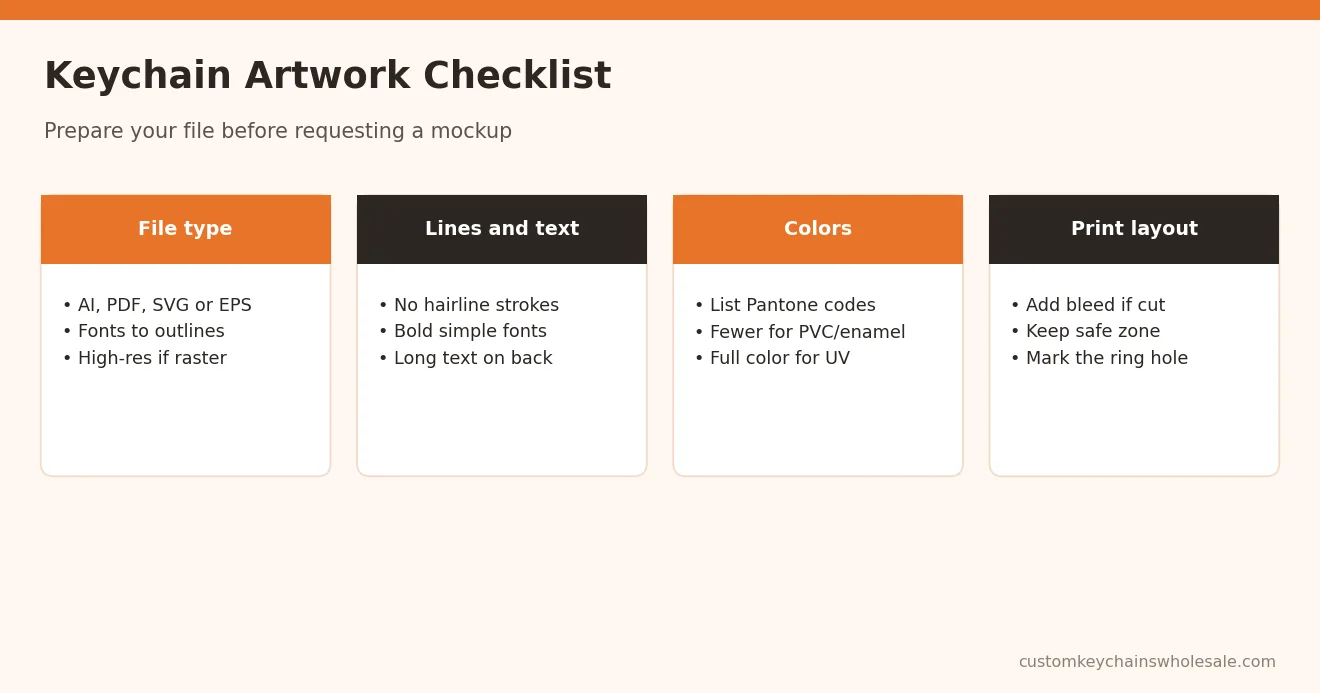
- Convert fonts to outlines so text displays correctly on any computer.
- Use spot colors or list Pantone codes for every color in the design.
- Remove hidden layers, guides and unused objects to avoid confusion.
- Draw the outline shape if you want a custom cut or die shape.
- Show both sides if the keychain has a front and back design.
- Add a size note, such as the target height or width in millimeters.
A clean, labelled file allows the factory to produce an accurate mockup quickly and reduces the number of revision rounds. If you are ordering several designs, name each file clearly with the design name and intended material so nothing is mixed up when quotes and mockups come back.
Line Thickness and Fine Detail
Keychains are small, so detail that looks sharp on a large screen may disappear in production. Each method has its own practical limits:
- Soft PVC: thin raised lines between colors can merge or break if too fine.
- Enamel metal: metal lines separating enamel colors need enough width to hold the colors apart.
- Laser engraving: handles fine lines well, but very small details can lose contrast.
- UV printing: reproduces fine detail best, though tiny elements may still be hard to see.
As a general rule of thumb, avoid hairline strokes and thicken thin elements before sending your file. Your supplier will flag lines that are too thin in the mockup and suggest adjustments.
Minimum Text Size
Small text is the most common artwork problem. Text that is readable on a business card may be too small on a molded or enameled keychain. General guidance:
- Keep essential text as large as the design allows.
- Prefer bold, simple fonts over thin scripts or serif fonts with fine strokes.
- Place long text, such as a website, on the back where there is more space.
- Expect molded and enamel methods to need larger text than UV printing or laser engraving.
If your design includes a slogan, website and phone number, consider which one really needs to be on the keychain. Simpler designs usually look more professional, and they are easier to read from a distance when the keychain hangs from a bag or a set of keys. A QR code can replace long text, but it must be printed large and clear enough to scan reliably, so test it on the sample.
Color Count and Production Method
Color count matters differently depending on the method:
- Soft PVC and enamel: each color is filled separately, so more colors mean more work and can affect price.
- Screen printing: each color needs its own screen.
- UV and offset printing: full color is possible without extra cost per color.
- Laser engraving: single tone only.
Supply Pantone references so colors can be matched as closely as the material allows. Simplifying gradients into flat colors often improves molded and enamel designs.
Bleed and Cut Lines for Printed Keychains
Printed keychains, such as acrylic or printed metal inserts, are cut or shaped after printing. Bleed is extra background artwork that extends beyond the cut line so no unprinted edge appears if the cut shifts slightly.
- Extend background colors and images slightly beyond the final shape.
- Keep important text and logos a safe distance inside the cut line.
- Supply the cut line as a separate, clearly named path or layer.
- Mark any holes for rings so they do not cut through key details.
Exact bleed and safe-zone measurements vary by supplier and method, so ask for a template. Artists can find more detail in our acrylic keychain sourcing guide for artists and brands.
Common Artwork Mistakes to Avoid
- Sending a low-resolution screenshot of a logo.
- Leaving fonts live instead of converting to outlines.
- Using colors without Pantone references when brand color matters.
- Placing the ring hole over part of the logo.
- Forgetting the back-side design until after approval.
Our step-by-step guide to customizing keychains with your logo shows how artwork fits into the full order process.
Mockup Approval and Samples
After you send your artwork, you receive a free digital mockup showing shape, colors, size, attachment and logo placement. Check every detail, including spelling, before approving. For large or complex orders, a physical sample lets you see real size, color and texture; our article on digital proofs vs physical samples explains when it is worth it.
Once approved, the artwork is used to make molds or set up printing. Molds are kept for repeat orders, so keep your approved file for future reference. For the overall process, see how to order custom keychains.
Get a Quote for Custom Keychain Artwork and Production
Ready to turn your artwork into keychains? Send your logo or design file (vector preferred), target size, material, quantity and packaging needs. If your file is not production-ready, tell us and we will advise what to adjust.
Contact us for a free digital mockup and quote. MOQ usually starts from 100 pcs depending on material and design; confirm per quote.
Frequently Asked Questions
What file format is best for custom keychain artwork?
Vector formats are best: AI, vector PDF, SVG or EPS. They scale without losing quality and let the factory separate colors accurately for molds, enamel or printing. Convert fonts to outlines and list Pantone colors. If you only have a PNG or JPG, send the highest resolution available and check the redrawn mockup carefully.
Can I send a PNG or JPG logo?
Yes, but vector files give better results. A high-resolution PNG or JPG can work for full-color UV printing or as a reference for redrawing simple logos. Low-resolution screenshots usually cause blurry edges or lost detail. If redrawing is needed, review the mockup carefully to confirm shapes, spelling and colors before approving.
How small can text be on a keychain?
It depends on the material and method. Molded PVC and enamel metal usually need larger text than UV printing or laser engraving. Use bold, simple fonts, keep essential text as large as possible and move long text such as websites to the back. Your supplier will flag text that is too small in the mockup.
Do I need bleed on keychain artwork?
Bleed is needed for printed designs that are cut after printing, such as acrylic keychains or printed metal inserts. Extend background colors slightly beyond the cut line and keep text inside a safe zone. Molded PVC and enamel designs do not usually need bleed. Ask your supplier for a template with exact measurements.
Will you fix my artwork if it is not production-ready?
For simple logos we can often adjust or redraw artwork while preparing the free digital mockup, for example thickening thin lines or simplifying colors. Complex illustrations may need changes from your designer. Always check the mockup carefully, including spelling and colors, because the approved mockup is what production follows.